This is my complete Echo Aviation Controller profile for the Just Flight PA‑28R Arrow III in MSFS 2024.
The goal is a clean, intuitive setup that mirrors the aircraft’s real‑world workflow and avoids unnecessary bindings.
Flight Control Surfaces
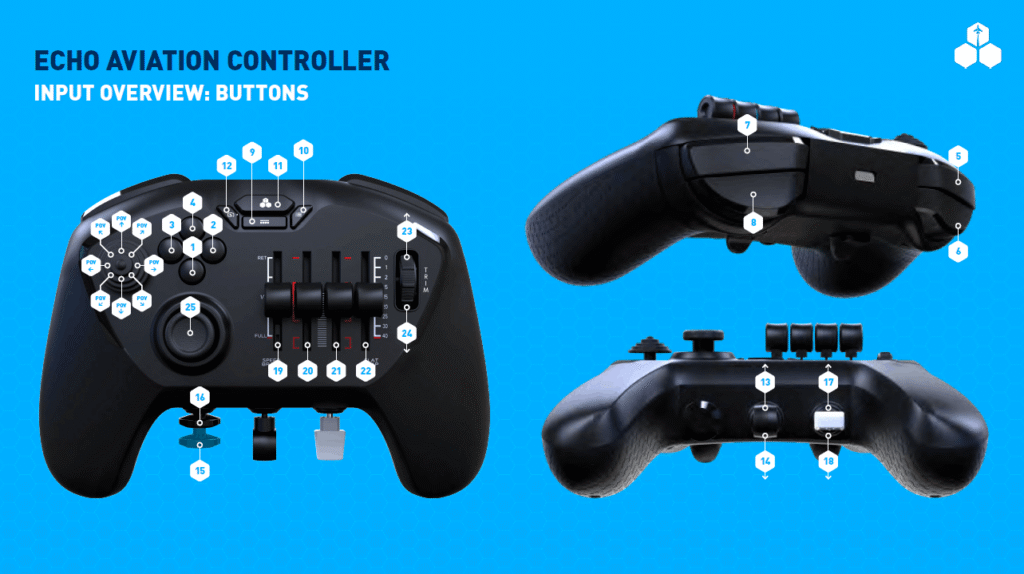
- Elevator Trim Down (Nose Down) — Button 23
- Elevator Trim Up (Nose Up) — Button 24
- Decrease Flaps — Button 17
- Increase Flaps — Button 18
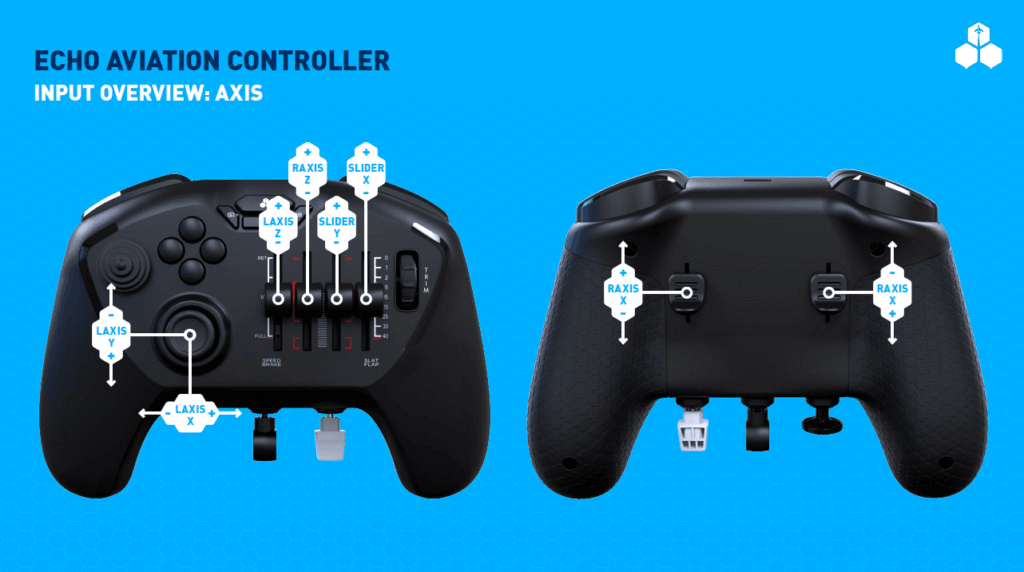
- Rudder Axis — Joystick R Axis X
- Ailerons Axis — Joystick L Axis X
- Elevator Axis — Joystick L Axis Y
Autopilot
- Auto Throttle to GA — Button 7
- Toggle Flight Director — Button 5
Brakes
- Parking Brakes On — Button 15
- Parking Brakes Off — Button 16
Power Management
- Mixture Axis (-100 to 100%) — Joystick Slider X
- Propeller Axis — Joystick Slider Y
- Throttle Axis — Joystick R Axis Z
Landing Gear
- Gear Up — Button 13
- Gear Down — Button 14
Tools
- Display Checklist — Button 9
Camera Controls
- Reset Cockpit View / Reset External View — Button 25
- External Quick View Left / Previous Instrument View — POV Left
- External Quick View Rear / Previous Pilot Position — POV Down
- External Quick View Right / Next Instrument View — POV Right
- External Quick View Top / Next Pilot Position — POV Up
- Cockpit / External View Mode — Button 12
Player Character
- Take Control of Character — Button 10
Notes
- Tested in MSFS 2024 with the Just Flight Arrow III.
- Designed for a minimal, conflict‑free control layout.
- Ideal for users who prefer clean, predictable bindings without over‑mapping.
Leave a Reply